The Drawer That Points Back
178 addressable LEDs, a label printer, and an ESP32 display, all wired to Homebox so the real drawer lights up when you look up a part.

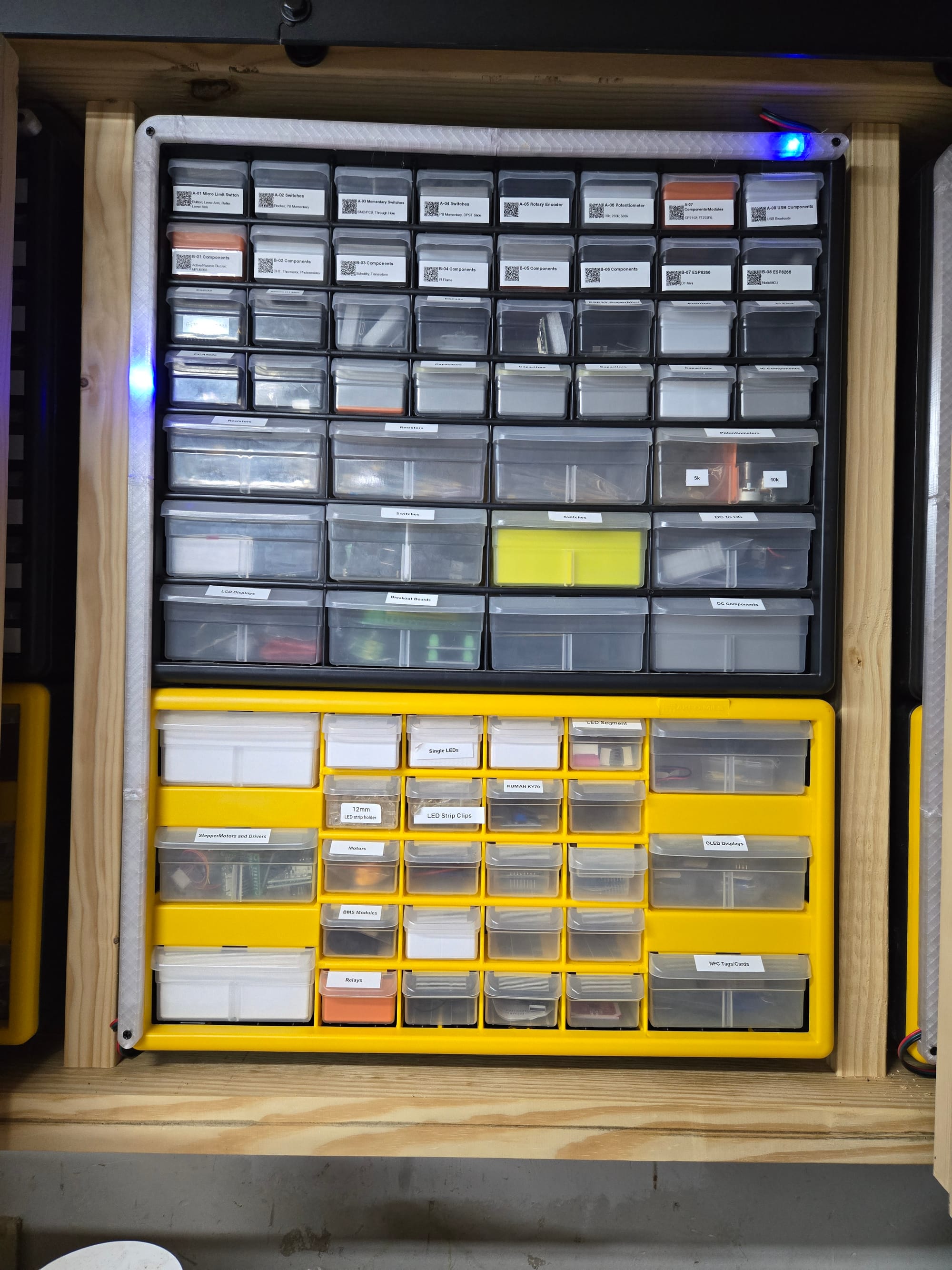
178 individually-addressed LEDs, a label printer, and a small ESP32 screen, all wired to one question: when I look up a part, can the real drawer just tell me where it is?
Somewhere in eighteen stacked drawer units, in one of about two hundred labeled bins, is the exact screw, connector, or resistor I need — and I have never once been able to remember which one just by thinking about it. I already catalog every part in Homebox, a self-hosted inventory app: search "M8 hex head," and it tells me the part lives in location D-03. What it can't do is get me the rest of the way there. So I built the rest of the way: look a part up on screen, and the actual physical drawer lights up.
The signal that doesn't exist
The obvious plan — hook whatever event fires when Homebox shows you a location — runs into a wall immediately: Homebox's API has no concept of "viewing" anything. It exposes create/update/delete. There's no server-side event for "a human just looked at this." The only real signal is the browser's own request to render the page — an ordinary GET /api/v1/entities/{id} — which was never meant to be watched, but is tappable either way.
I first watched for it client-side, with a Tampermonkey script polling the browser's URL. It works, but only on whatever device has the script installed. The real version sits a layer lower: a small nginx instance in front of Homebox that passes every request through completely unmodified, and quietly mirrors the URL of that one specific GET pattern to Home Assistant. It never touches a request or response body, never sees a credential, and doesn't care whether a laptop, phone, or shared PC made the call. Three independent systems — Homebox, Home Assistant, WLED — glued together at the edges, with the one thing worth protecting (the API token) living in exactly one place: Home Assistant's own secrets, never the browser.
Turning a name into a pixel
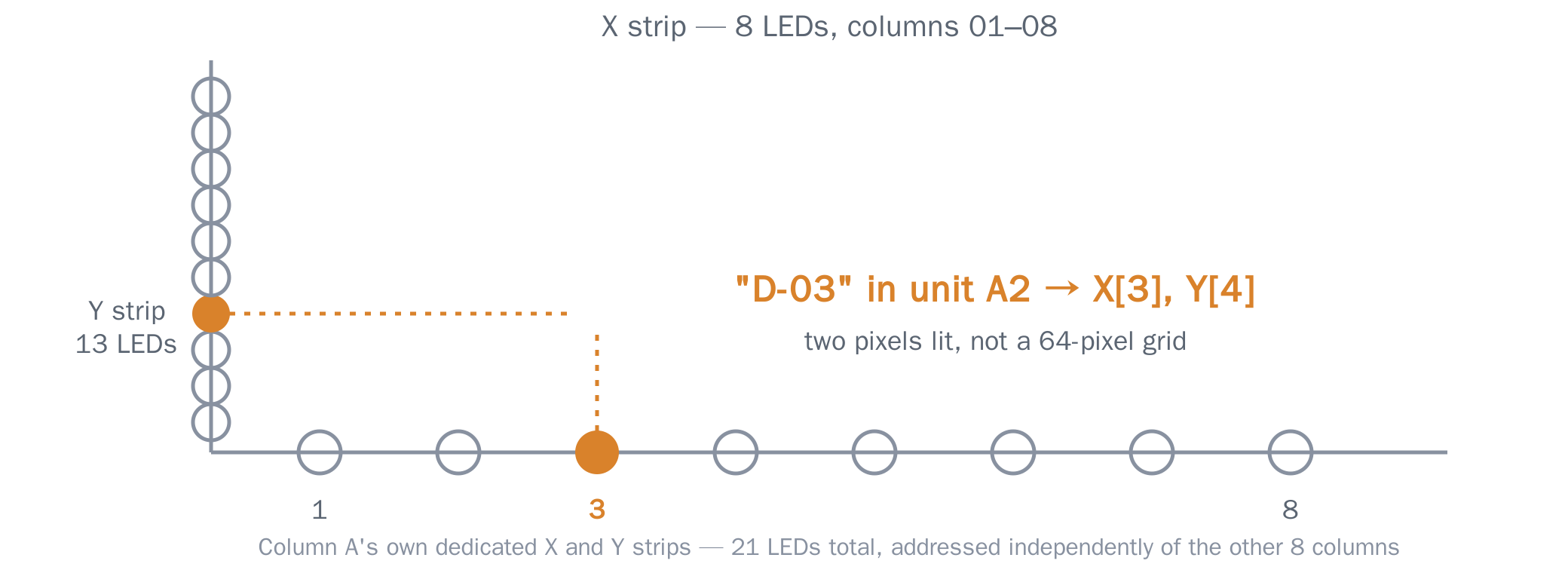
The part that turned out to be genuinely hard wasn't the network plumbing — it was translating a Homebox location name into the right two LEDs, because "the right two LEDs" is not a clean grid. Each drawer stack is addressed with one shared 8-LED strip across the columns and one continuous strip running down through both units — a drawer like D-03 lights the 3rd LED on one strip and the 4th on the other. Two pixels, not sixty-four.
What makes it interesting is that none of the physical wiring is uniform. Some columns have eight rows in their top unit, some have seven, some have six — wired that way because that's how many drawers actually exist in that column, not because anyone was thinking about firmware convenience. Some rows use wide bins spanning two LED slots instead of one. None of it is derivable from a formula; it's a set of lookup tables built from the actual physical layout, one column at a time.
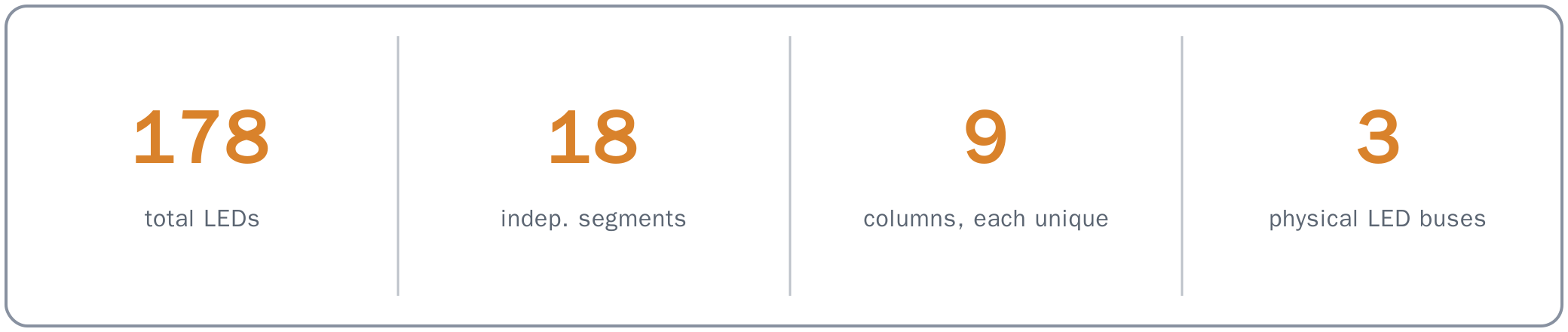
That non-uniformity is also why each of the 9 columns ends up with its own dedicated pair of LED segments — 18 segments across 178 LEDs and 3 physical buses — instead of one shared strip per bus: a column's two physical strips aren't next to each other in the wiring, so a single lit drawer can't be one contiguous range. All 18 run the same idle animation in sync, but each is addressed completely independently, and the math has to know which column's own table applies before it can light anything at all.
Two bugs that looked nothing like themselves
Real hardware produces a specific flavor of bug: the kind where every layer of the stack reports success, and the thing in front of you still doesn't work.
The strip that wouldn't animate. Setting an individual pixel on this LED controller (WLED) does something undocumented in the moment it happens: it silently freezes that whole segment's effect engine, holding the exact static frame until something explicitly un-freezes it. The idle "breathe" animation would report itself correctly selected in WLED's own UI — right effect, right color, right speed — and nothing would move, because the segment was still frozen from the highlight that ran before it. The fix was one flag, set explicitly on every idle transition, but finding it meant not trusting a status field that says "this is configured correctly" while the actual light does something else entirely.
The five-second photo. The ESP32 display shows a thumbnail of whatever part you're looking at, and uploading that thumbnail was taking about five seconds — with the Homebox fetch and the image conversion both measured, independently, at under 250 milliseconds. The other 4.75 seconds were hiding in the ESP32's own HTTP library: its raw-body parser always asks to fill a fixed-size chunk buffer, even on the last chunk of an upload where only a fraction of that size is left. On the final chunk, it kept asking for bytes that were never going to arrive, and sat there retrying until an internal timeout finally gave up. The fix was sizing that buffer to exactly match the one and only payload size this device will ever receive, so the last chunk is never partial. Five seconds became about a tenth of one.
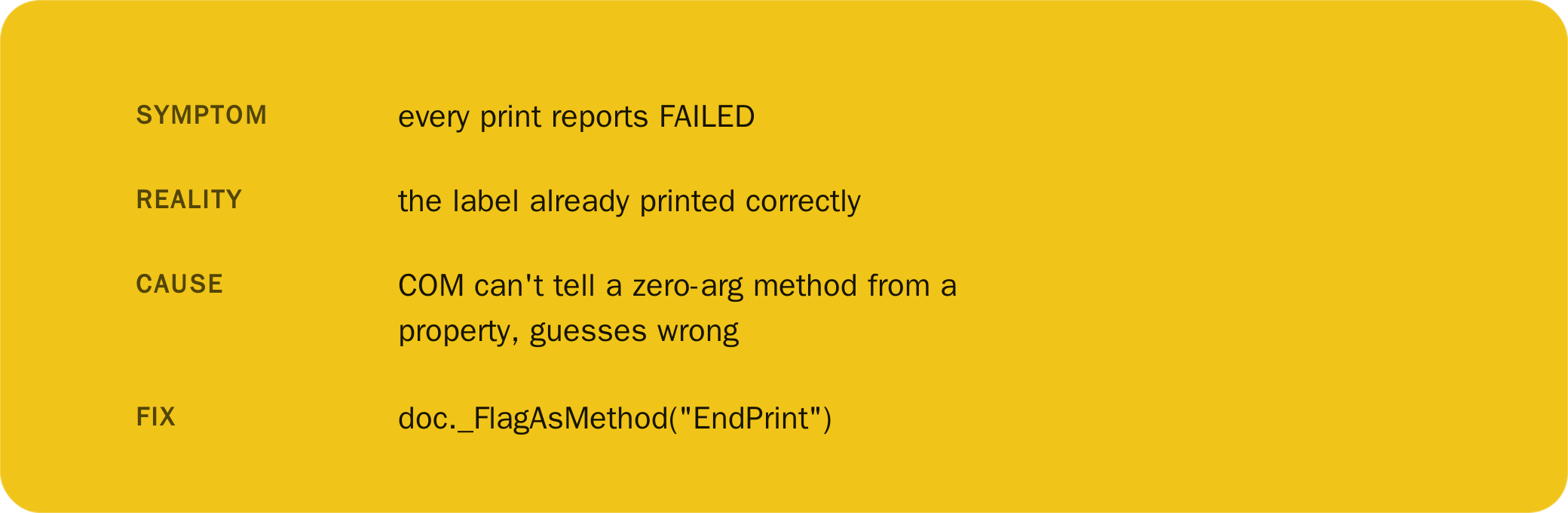
That last one is from the least glamorous piece of this project: a small internal web page that batch-prints the actual physical bin labels, driving a Brother label printer through Windows' COM automation. Calling a method with zero arguments through late-bound COM makes it functionally indistinguishable from reading a property, and the library guesses property — handing back a boolean instead of running the call. The print itself had already happened by the time this broke; the only casualty was the report of whether it worked, which was wrong every single time until one explicit flag told the dispatcher "no, this one's a method."
Platform behavior, not my bugs
A separate category entirely: things Home Assistant does on purpose that looked, from the inside of a broken automation, exactly like a bug in my own code.
- A comparison that should obviously be true was always false. Home Assistant silently converts a template's output to a native number whenever the text would round-trip cleanly through
int()— but a value like"03"doesn't round-trip, so it stays a string. The same field could arrive as either type depending on its value, breaking a plainin [...]string comparison. Fixed by casting explicitly everywhere instead of trusting either type. - A lookup table that visibly had the right key still missed. Saving a UI-managed automation round-trips its whole config through JSON, and JSON object keys are always strings — so a table written with integer keys in YAML silently became string keys after the first save, even though the trace view showed the key sitting right there.
- An idle timeout occasionally just didn't fire. A trigger's
for:duration can't be a template at all — a real, still-open Home Assistant limitation, not a syntax mistake. Rebuilt around a once-a-minute check that does the elapsed-time math itself instead.
What's next
The current display is wall-mounted and reacts to whatever's on screen in a browser somewhere. The idea I keep coming back to is a battery-powered, hand-held version with its own QR scanner built in — scan the same code already printed on every bin's label, and get the same display, the same live quantity, the same +/- buttons, standing right at the drawer instead of in front of a monitor. Nothing about it is scoped yet; it's a real idea, not a plan.
Every layer reported success. The light just didn't move.
None of this needed to exist — a spreadsheet and a decent memory would technically work. But there's a specific satisfaction in typing a part number and watching a drawer three feet away answer back, and in knowing exactly which byte was wrong the three times it didn't.